


You can accept bKash on a website in three ways. 1) Number + TrxID: show your bKash number at checkout, the customer pays from their app and enters the transaction ID, and you match it manually; this works today with no paperwork. 2) bKash merchant payment gateway: the customer pays on a bKash page during checkout and the payment is confirmed automatically; you need to apply with a trade licence and business papers. 3) An aggregator such as SSLCommerz: one integration gives you bKash, Nagad, cards and banking. Most shops start with option 1 and add 2 or 3 as orders grow.
bKash is one of the most familiar ways to pay online in Bangladesh, so it is usually the first payment method a new online shop wants. The phrase "bKash payment gateway integration" covers several very different setups, though, and the right one depends on your volume, your paperwork and how much manual checking you can handle. This guide explains each option, what you need to apply, how integration works technically, and how to set it up on Metanoz. A Bangla version of this guide is available: ওয়েবসাইটে বিকাশ পেমেন্ট নেওয়ার নিয়ম.
In this article
Three ways to take bKash online
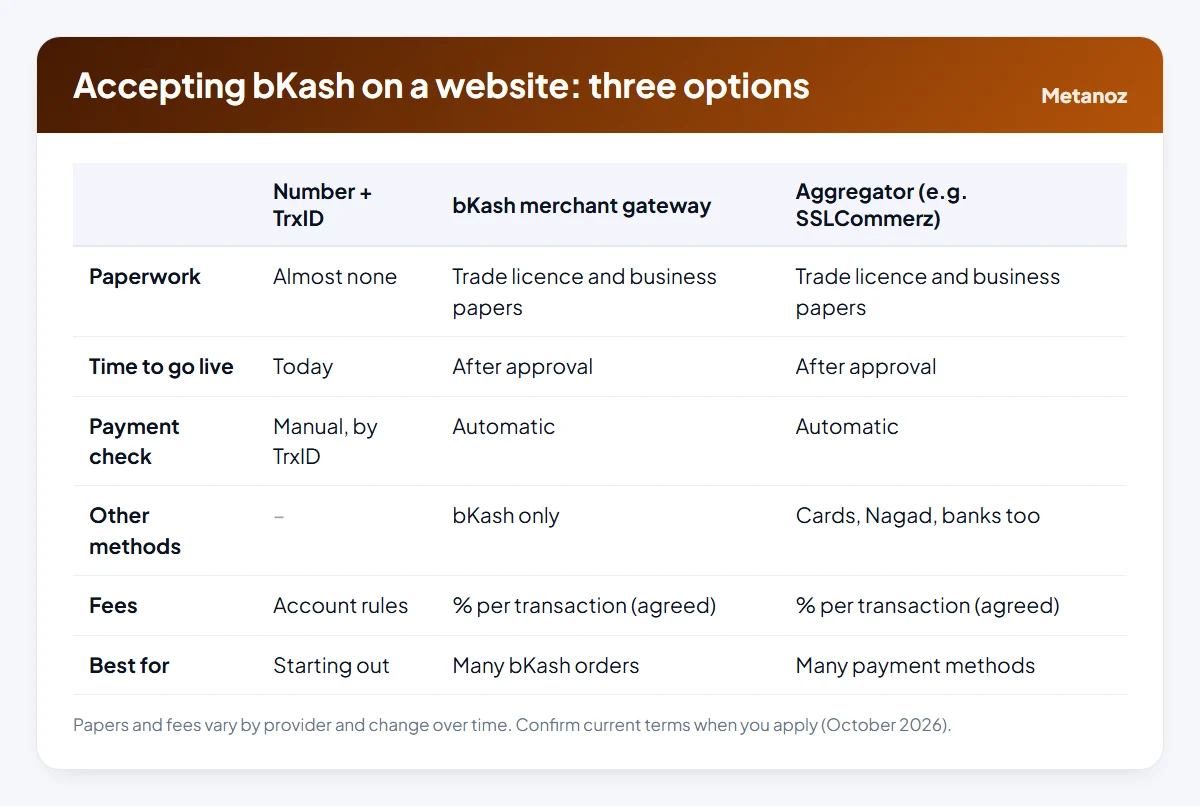
These options are not exclusive. A common pattern is to launch with number + TrxID, apply for a gateway at the same time, and keep both available for a while after the gateway is approved.
Option 1: your number and a TrxID
At checkout, the customer sees your bKash number and short instructions. They pay from their own bKash app and type the transaction ID (TrxID) into the order form. You open your bKash app, find the transaction, check the amount, and mark the order as paid.
Strengths and limits
Strengths
- Live today, no application
- No gateway fee on top
- Money arrives in your account immediately
Limits
- Every payment is checked by hand
- Slower and more error-prone as volume grows
- Personal accounts have limits and are meant for personal use
Personal or merchant number? bKash offers merchant accounts for businesses, where customers pay using the "Payment" option rather than "Send Money". For regular business income a merchant account is the appropriate choice. Check bKash's current rules and limits.
Never accept a screenshot as proof of payment. Screenshots are easy to fake; only the transaction in your own app counts. Match the amount as well as the TrxID, and make sure the same TrxID is not used for two orders.
Option 2: a bKash merchant payment gateway
With a gateway, the customer chooses bKash at checkout and is taken to a payment page where they enter their wallet number, an OTP and their PIN. When the payment succeeds, your website is told automatically. There is no manual matching and no mistyped TrxIDs.
What you usually need to apply
- A valid trade licence (see our guide to the trade licence for an online business)
- The owner's national ID and photo
- A bank account for settlements, ideally in the business name
- A live website with products, prices in taka, contact details, and refund and privacy policies
- Sometimes a TIN or other documents
Requirements change, so get the current list from the provider when you apply. Applications go faster when the business name matches across the trade licence, bank account and website.
Fees
Gateways charge a percentage of each successful transaction. The rate depends on your agreement, business type and volume, and it changes over time, so get it in writing when you apply rather than relying on a number from a blog. Build the fee into your pricing.
How integration works (for developers)
Whether you connect bKash directly or through an aggregator, a secure integration follows the same shape:
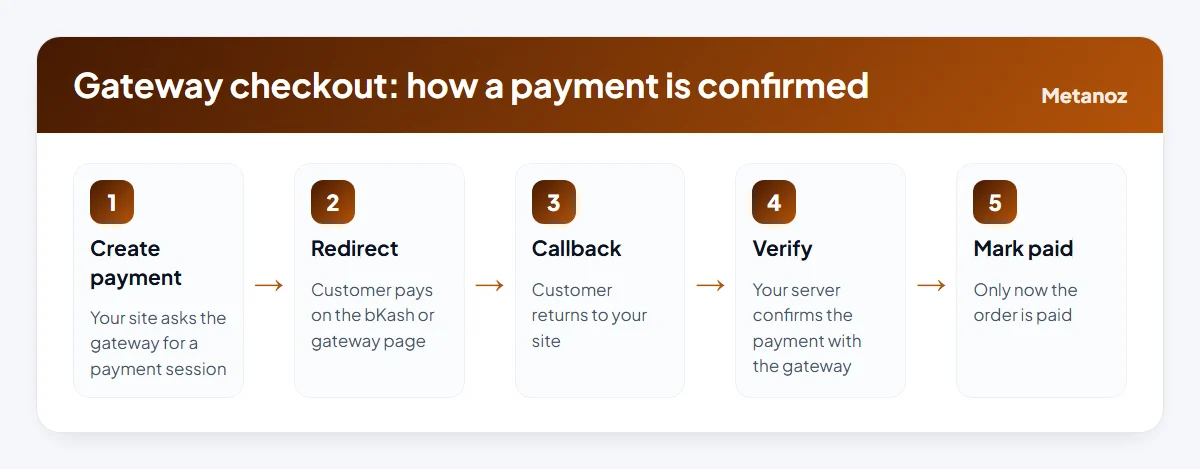
- Create a payment session from your server with the amount, currency and your order reference, using the credentials from the provider. Never put secret keys in browser code.
- Redirect the customer to the payment page returned by the gateway.
- Handle the callback when the customer returns, whether the result is success, failure or cancel.
- Verify on the server. Before marking anything as paid, ask the gateway (server to server) to confirm the payment status, amount and reference. A return URL alone is not proof; anyone can open it.
- Mark the order paid once, store the gateway's transaction ID, and make the step idempotent so a repeated callback cannot create a second paid order.
Test everything in the provider's sandbox first, including failed and cancelled payments, then switch to live credentials.
Option 3: an aggregator such as SSLCommerz
An aggregator gives you many payment methods through one integration: bKash, Nagad and other mobile wallets, Visa and Mastercard, and internet banking. The paperwork is similar to a merchant gateway, fees vary by method, and settlements go to your bank account on a schedule. If your customers like to pay in different ways, this is usually the most practical route. Our comparison of payment gateways in Bangladesh covers the main options.
Which option should you choose?
| Your situation | Start with |
|---|---|
| Just starting, a few orders a day, papers not ready | Number + TrxID, plus cash on delivery |
| Many orders a day, mostly bKash | bKash merchant gateway |
| Customers pay with cards, Nagad and bKash | An aggregator such as SSLCommerz |
| Some customers abroad | An aggregator for cards, plus international options |
Setting it up on Metanoz
On Metanoz, the online store (from the Business plan) supports two of these routes out of the box:
- bKash and Nagad numbers with TrxID. In Admin → Settings → Payment method, enter your number, a display name and short instructions for customers, and switch it on. When an order arrives, check the TrxID and amount in your own app, then mark the payment as "Paid". The money goes straight to your number; Metanoz takes no commission. Cash on delivery is switched on from the same page. Steps are in the Help Center guide.
- SSLCommerz with your own merchant account. Enter your Store ID and Store Password in the SSLCommerz section of the same page. Metanoz tests the connection when you save, and every payment is confirmed server to server with SSLCommerz before the order is marked "Paid". Customers can then pay by card, bKash, Nagad or bank. See the SSLCommerz guide.
For buyers outside Bangladesh, the International Payments app adds Stripe and PayPal payments into your own accounts; whether a Bangladesh-based business can open those accounts depends on each company's country rules.
Security checklist
Most payment fraud against small sellers is social engineering, not hacking. These rules prevent most of it.
- Only your own app or the gateway's report proves a payment. Not screenshots, not phone calls.
- Never share your PIN or OTP. No provider will ask for them by phone.
- For "I sent money by mistake, please return it" calls, check your own transaction history first.
- Keep gateway credentials private and rotate them if a staff member who had them leaves.
- Reconcile daily: paid orders against transactions received.
Start your website today
Pick a template and a name; Metanoz sets up the rest. 7 days free, no card needed.
Start freeSee templatesFrequently asked questions
Do I need a trade licence for a bKash payment gateway?
Usually yes. Merchant gateways and aggregators such as SSLCommerz normally ask for a valid trade licence, the owner's national ID and bank account details. Check the current requirements when you apply.
Can I accept bKash on my website without a gateway?
Yes. Show your bKash number at checkout, ask for the TrxID, and match it in your own app before confirming the order. It is the simplest way to start.
How much does a bKash payment gateway charge?
A percentage of each successful transaction, which depends on your agreement, business type and volume and changes over time. Ask for the rate in writing when you apply.
Is SSLCommerz the same as a bKash gateway?
No. SSLCommerz is an aggregator: one integration covers bKash and many other methods, including cards and Nagad. A direct bKash gateway covers bKash only.
Does Metanoz charge a commission on bKash payments?
No. With the number and TrxID method the money goes straight to your bKash or Nagad number. With SSLCommerz, only SSLCommerz's own fees apply.
How do I stop fake bKash payment claims?
Confirm every payment in your own app or gateway report, match both TrxID and amount, and never ship on the strength of a screenshot.
 ওয়েবসাইটে বিকাশ পেমেন্ট নেওয়ার নিয়ম: পার্সোনাল, মার্চেন্ট নাকি গেটওয়ে?
 How to Open a bKash Merchant Account for an Online Shop
 Payment Gateways in Bangladesh Compared (October 2026)