

A bKash merchant account is the business version of bKash: customers pay you with the Payment option or a QR code instead of Send Money. To open one you usually need a trade licence, the owner's NID and photo, a business address and a bank account, sometimes a TIN, and you apply through bKash's official website or sales team, followed by verification. For a website you can show the merchant number at checkout and match each TrxID by hand, or apply separately for bKash's online payment gateway (or an aggregator such as SSLCommerz) so payments are confirmed automatically.
Many online shops in Bangladesh start by asking customers to send money to the owner's personal bKash number. It works for the first few weeks. Then limits get in the way, business and household money mix in one wallet, and nobody can tell which payment belongs to which order. This guide explains the bKash account types, what papers a merchant account usually needs, how the application goes, and how to connect the account to your online shop.
Information as of October 2026. bKash sets its own account rules, limits, fees and application process and changes them from time to time. Check the current details with bKash before you apply.
In this article
bKash account types
Personal account
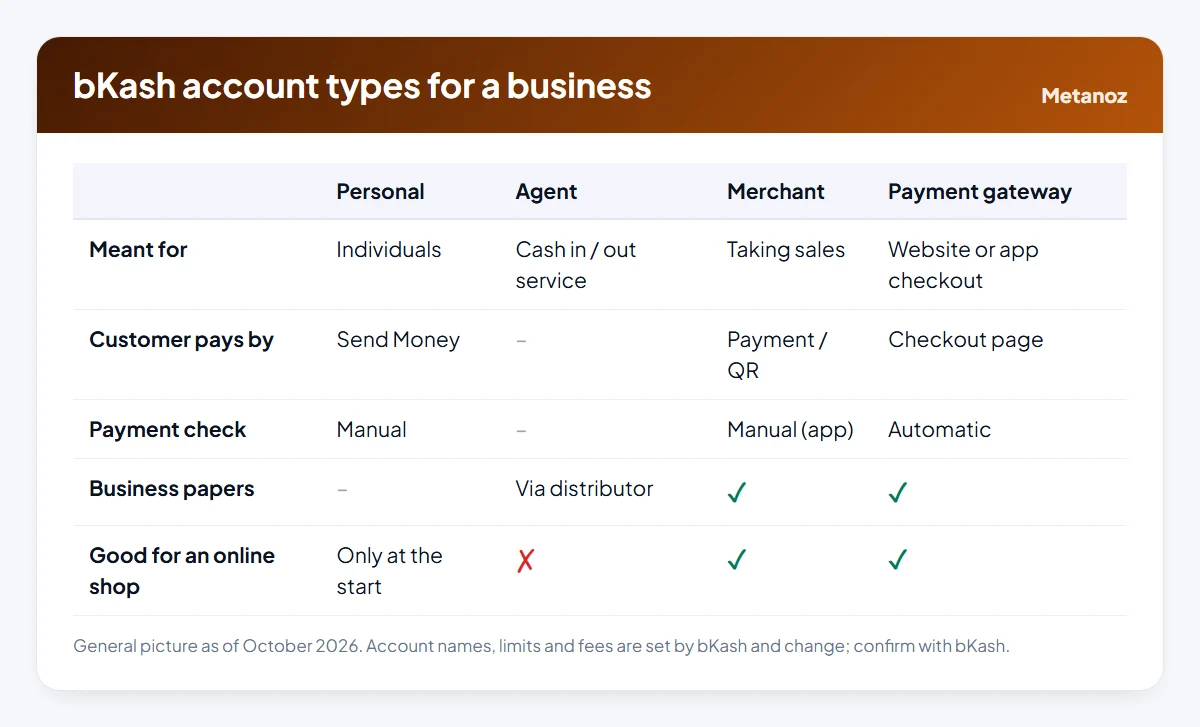
The account almost everyone has. It is meant for individuals: sending money to family, paying bills, shopping. Using it for steady business income is a poor fit. Personal accounts have transaction limits, payments arrive as Send Money mixed with personal transfers, and if the volume looks like a business, the account may face restrictions.
Agent account
Agents provide cash-in and cash-out services to the public, usually from a shop, and are appointed through bKash's distribution network. An agent account is not a way to take sales for your own products, so it is not what an online shop needs.
Merchant account
This is the account designed for selling. Customers choose Payment (sometimes shown as Make Payment) in their app, enter your merchant number or scan your QR code, and pay. Payments are recorded separately from personal transfers, which makes reconciliation and bookkeeping much easier. Merchant payment charges and the cost of moving money out are set by bKash; ask for the current terms.
Online payment gateway
For websites and apps, bKash also offers a payment gateway, where the customer pays on a bKash page during checkout and your site is told automatically that the payment succeeded. It usually involves a separate application and technical integration. Our guide to bKash payment gateway integration explains how that works.
Usual papers
The exact list depends on your business type and changes over time, but these are commonly requested:
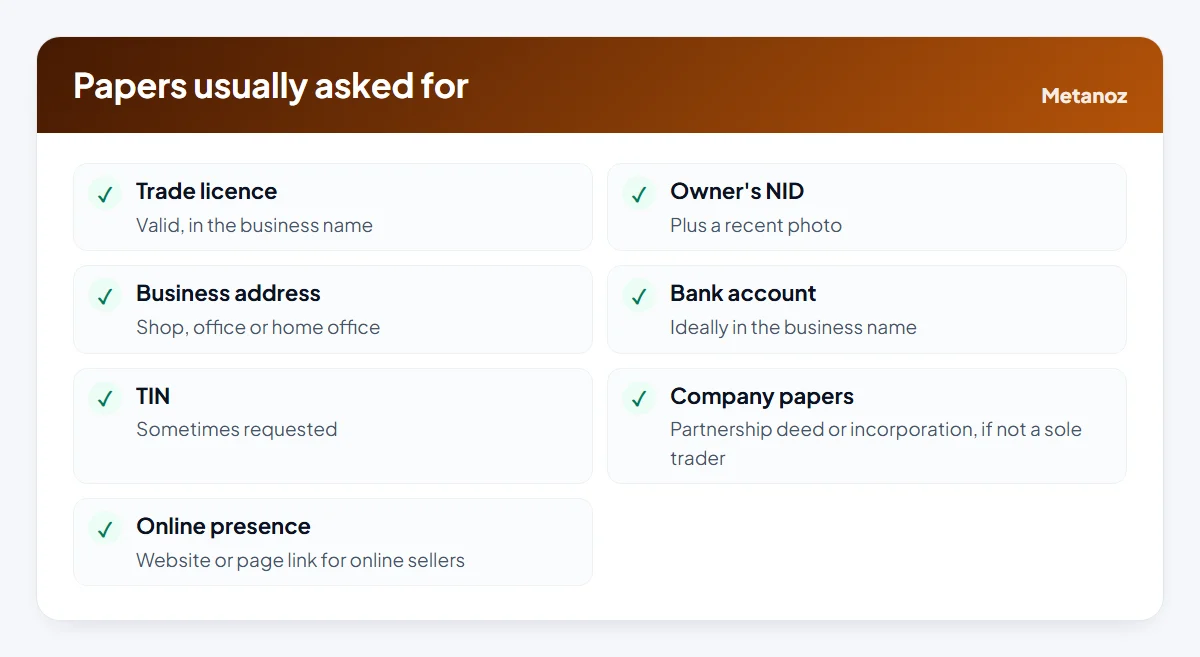
Two things save the most time. First, make the names match: the business name on the trade licence, the bank account and the website should be the same, or the difference should be easy to explain. Second, get the trade licence first. Most other steps depend on it. Our guide to the trade licence for an online business covers the papers and the process at the city corporation or local office.
This is general information, not legal or financial advice. Requirements differ by business type and change over time; always use the list bKash gives you.
Application steps
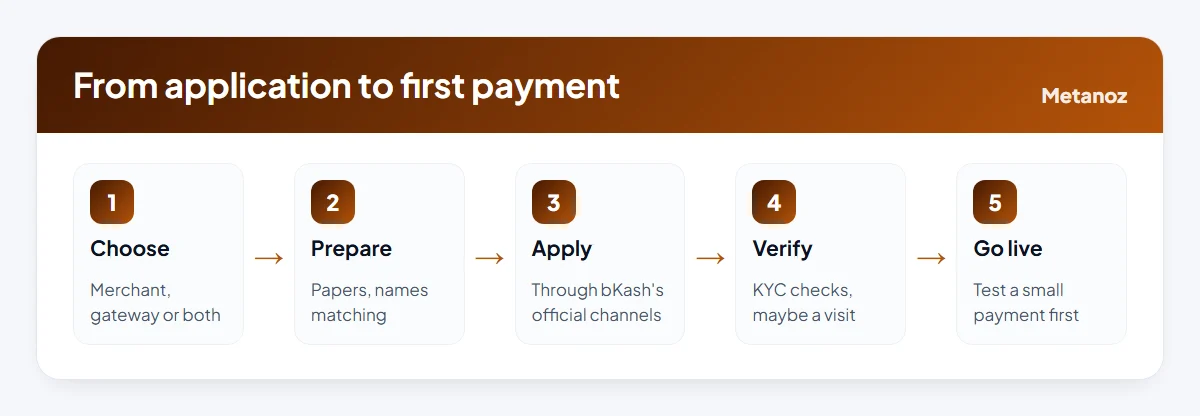
- Decide what you need. A merchant number for TrxID payments, the online gateway for automatic checkout, or both. Many shops start with the merchant number and add the gateway when orders grow.
- Prepare your papers. Scan them clearly. Keep a PDF folder so you can reuse it for other providers too.
- Apply through official channels only. Use bKash's official website or app, or its sales team. Avoid middlemen who offer to "arrange" an account for a fee, and never share your PIN or OTP with anyone during the process.
- Complete verification. bKash may check your documents, call you, or visit your shop or office. Online sellers may be asked to show their website or page.
- Receive your account details. You get the merchant wallet and, usually, access to a merchant app or portal to see payments.
- Test before announcing. Ask a friend to make a small payment and check how it appears in your app, then update your checkout instructions.
Timelines vary. Plan for it to take some days rather than hours, and keep selling with cash on delivery in the meantime.
After approval
- Set up the merchant app or portal so you can see each payment with its TrxID, amount and time.
- Add staff access carefully. If others check payments, find out whether bKash offers separate logins or roles, rather than sharing the owner's PIN.
- Print or display your QR code if you also sell in person, at a stall or a fair.
- Learn how money moves out. Ask how transfers to your bank account work, what they cost and how long they take. Build any cost into prices.
- Reconcile every day. Match payments in the app against orders marked paid. Look for the same TrxID used twice and for short payments.
- Keep statements. Download monthly statements for your accounts and tax records.
Connecting to your website
There are three ways to use your new merchant account online.
1. Merchant number with TrxID
Show your merchant number at checkout with a short instruction, for example "Use Payment (not Send Money) to this merchant number, then enter the TrxID". When the order arrives, find the payment in your merchant app, check the amount, and mark the order paid. No integration is needed, but every payment is checked by hand.
2. bKash's online payment gateway
The gateway confirms payments automatically. It needs approval for online payments, credentials from bKash, and an integration that verifies each payment on your server, either built by a developer or provided by your website platform.
3. An aggregator
An aggregator such as SSLCommerz includes bKash alongside cards, Nagad and internet banking through one integration. If your customers pay in several ways, this is often simpler than separate gateways. Our comparison of payment gateways in Bangladesh covers the options.
On Metanoz
Metanoz's online store (from the Business plan) supports routes 1 and 3. In Admin → Settings → Payment method, enter your bKash number, a display name and your own instruction text; customers then pay and enter the TrxID, and you mark the order Paid after checking. Money goes straight to your number and Metanoz takes no commission. Steps are in the bKash and Nagad payments guide. For automatic bKash, card and bank payments, connect your own SSLCommerz merchant account using the SSLCommerz guide; every payment is verified with SSLCommerz before the order is marked Paid. Metanoz does not connect directly to bKash's own gateway API, so if that specific integration matters to you, choose a platform or developer that offers it. Other store features are listed on the features page.
Common mistakes to avoid
- Keeping the personal number on the website after the merchant account is live. Update every place: checkout, Facebook page, invoices, packaging inserts.
- Telling customers to "send money" to a merchant number. The instruction must say Payment, or customers get confused.
- Shipping against screenshots. Only the payment in your own merchant app counts.
- Sharing the owner's PIN with staff. If someone leaves, you have no control over the account.
- Ignoring cost of moving money out. Small percentages add up across a month; include them in your pricing.
Start your website today
Pick a template and a name; Metanoz sets up the rest. 7 days free, no card needed.
Start freeSee templatesFrequently asked questions
Can I open a bKash merchant account without a trade licence?
Usually not. A trade licence is one of the standard papers. bKash's options for very small sellers change from time to time, so ask bKash what is available for your situation.
What is the difference between a bKash merchant account and the payment gateway?
With a merchant account, customers pay your merchant number from their app and you check each payment yourself. With the payment gateway, the customer pays on a bKash page during checkout and your website is told automatically. The gateway usually needs its own application and integration.
How long does bKash merchant approval take?
It varies with your papers and the verification process. Expect days rather than hours, and keep taking cash on delivery while you wait.
Does a bKash merchant account have charges?
bKash sets its own charges for merchant payments and for moving money out of the account, and they change over time. Ask for the current terms in writing when you apply.
Can I use my merchant number on Facebook and my website at the same time?
Yes. It is the same number wherever you sell. Ask every customer to include the order number or their phone number in the payment reference if the app allows it, so matching is easier.
Does Metanoz work with a bKash merchant number?
Yes. Enter the merchant number in the bKash payment settings with an instruction to use Payment and enter the TrxID. For automatic confirmation, connect your own SSLCommerz account.
 bKash Payment Gateway Integration for Your Website: Options, Papers and Steps
 ওয়েবসাইটে বিকাশ পেমেন্ট নেওয়ার নিয়ম: পার্সোনাল, মার্চেন্ট নাকি গেটওয়ে?
 Payment Gateways in Bangladesh Compared (October 2026)