

Google-এ খুঁজে পাওয়ার প্রাথমিক কাজ (SEO)SEO basics: getting found on Google
শিরোনাম-বিবরণ, সাইটম্যাপ, Search Console আর অডিট।Titles and descriptions, sitemap, Search Console and the audit.
ভিডিওতে দেখুনWatch the video

হালনাগাদUpdated:
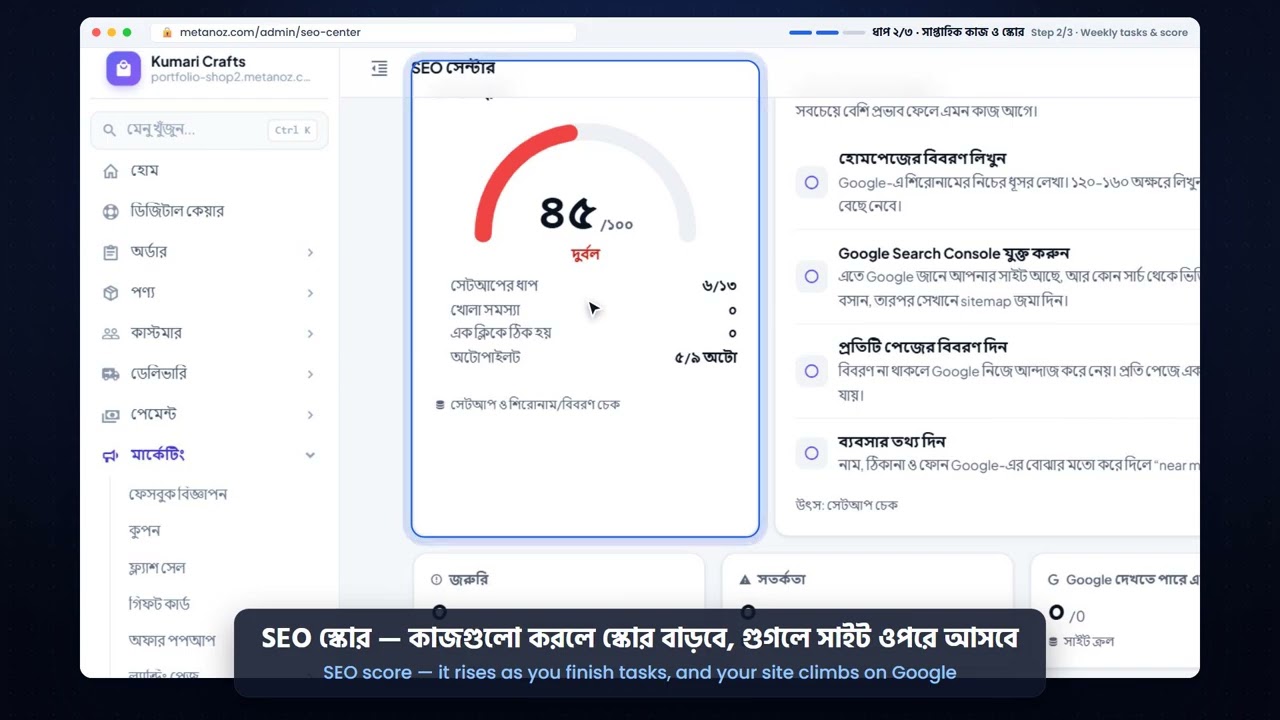
- Admin → SEO → Settings-এ সাইটের নাম, মূল বিবরণ আর শেয়ারের ছবি দিন।
- Admin → SEO → Meta-এ গুরুত্বপূর্ণ পেজ, পণ্য আর ক্যাটাগরির জন্য আলাদা শিরোনাম ও বিবরণ লিখুন। মানুষ যে শব্দে খোঁজে সেটি ব্যবহার করুন।
- Google Search Console-এ সাইট যুক্ত করুন; যাচাইয়ের কোড SEO → Settings-এ বসান। তারপর সাইটম্যাপ জমা দিন:
yoursite.com/sitemap.xml। - SEO → Audit চালিয়ে দেখুন কোথায় শিরোনাম, ছবির বিবরণ বা লেখা কম আছে, আর ঠিক করুন।
নিয়মিত ভালো লেখা (ব্লগ) আর আসল গ্রাহকের রিভিউ দীর্ঘমেয়াদে সবচেয়ে বেশি কাজে দেয়।
- In Admin → SEO → Settings, set your site name, main description and sharing image.
- In Admin → SEO → Meta, write a title and description for your important pages, products and categories. Use the words people really search for.
- Add your site to Google Search Console and paste its verification code in SEO → Settings. Then submit your sitemap:
yoursite.com/sitemap.xml. - Run SEO → Audit to see where titles, image descriptions or text are missing, and fix them.
Over time, good regular writing (a blog) and real customer reviews help the most.
এই আর্টিকেলটি কি কাজে লেগেছে?Was this article helpful?
আরও সাহায্য দরকার?Need more help? আমাদের টিমের সাথে মিটিং বুক করুনBook a meeting with our team