


To move from a Facebook page to a website, keep the page and add a shop next to it: pick a store template, add your best-selling products with your page's best photos, set delivery charges and cash on delivery plus bKash and Nagad, write about, delivery and return pages, add a "Shop Now" button and product links on Facebook, and tell your existing customers. The page keeps bringing people in; the website takes the orders, shows prices and stock, gets found on Google and keeps you selling if the page is ever restricted.
Many businesses in Bangladesh start on Facebook, and for good reason: customers are already there and it costs nothing to begin. But as orders grow, the same problems keep returning: answering "price?" a hundred times a day, addresses typed wrongly, orders lost in long chats, and payments to match by hand. This guide explains why a page alone becomes risky, what to prepare, the steps to set up your own website, how to connect it with your page, and what to do in the first month. If you prefer to read in Bangla, see ফেসবুক পেজ থেকে ওয়েবসাইট বানানোর নিয়ম.
In this article
Why a page alone is risky
A Facebook page is a great shop window, but you are renting space on someone else's platform, under rules you do not control.
- Restriction or hacking: a policy complaint, a mistaken report or a hacked admin account can take your page offline overnight, along with your contact with customers.
- Falling reach: how many people see your posts depends on Facebook's systems, which change. Posts that once reached many people may now reach few without paid ads.
- Manual work: every order is typed, checked and copied by hand. Mistakes grow with volume.
- Not found on Google: when someone searches for exactly what you sell, page posts rarely appear.
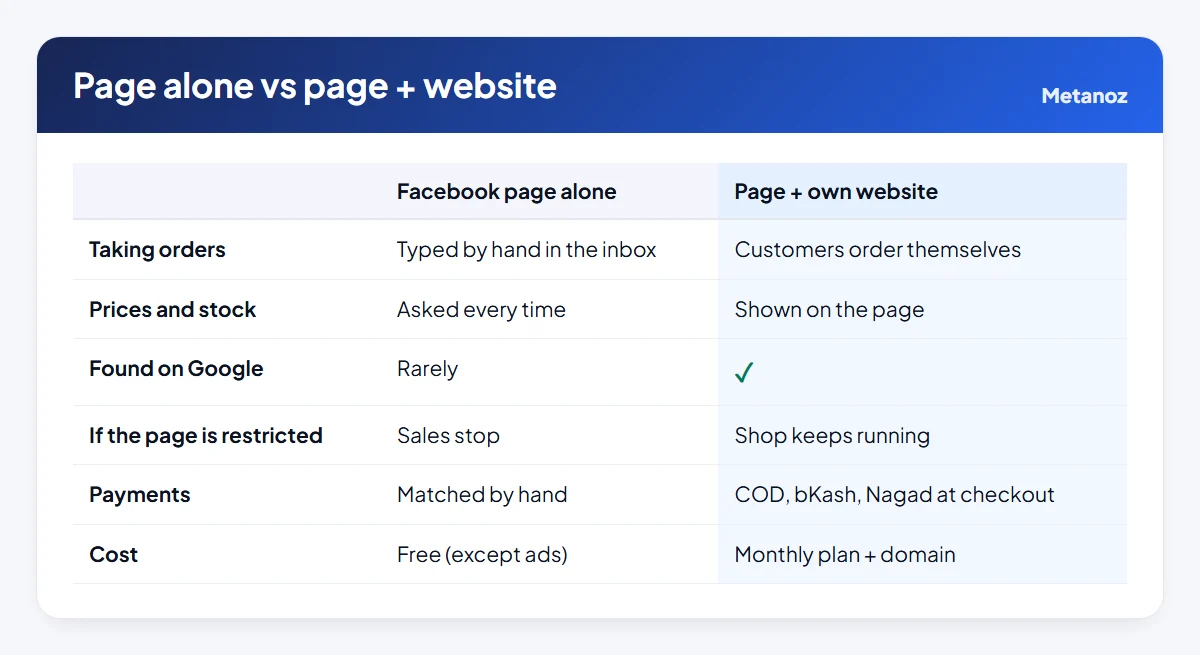
None of this means leaving Facebook. It means not putting your whole business in one place. For a fuller comparison, read our Bangla article ফেসবুক পেজ বনাম ওয়েবসাইট.
What to prepare
An evening of preparation saves a week of back-and-forth later:
- Product list: start with your 20–30 best sellers. Name, price, sizes or colours, and how many are in stock. A spreadsheet is fine.
- Photos: pick your clearest page photos, or retake them in daylight on a plain background. Same shape for every product.
- Descriptions: collect the answers you type most often in the inbox (fabric, size, care, delivery time). They become your product descriptions and FAQ.
- Delivery and payment rules: charges inside and outside Dhaka, your courier, delivery times, cash on delivery, and the bKash or Nagad numbers customers should use.
- Policies: exchange and return rules in plain words.
- Customer list: names and numbers of past buyers, if you have them, to tell them about the new shop.
Step by step
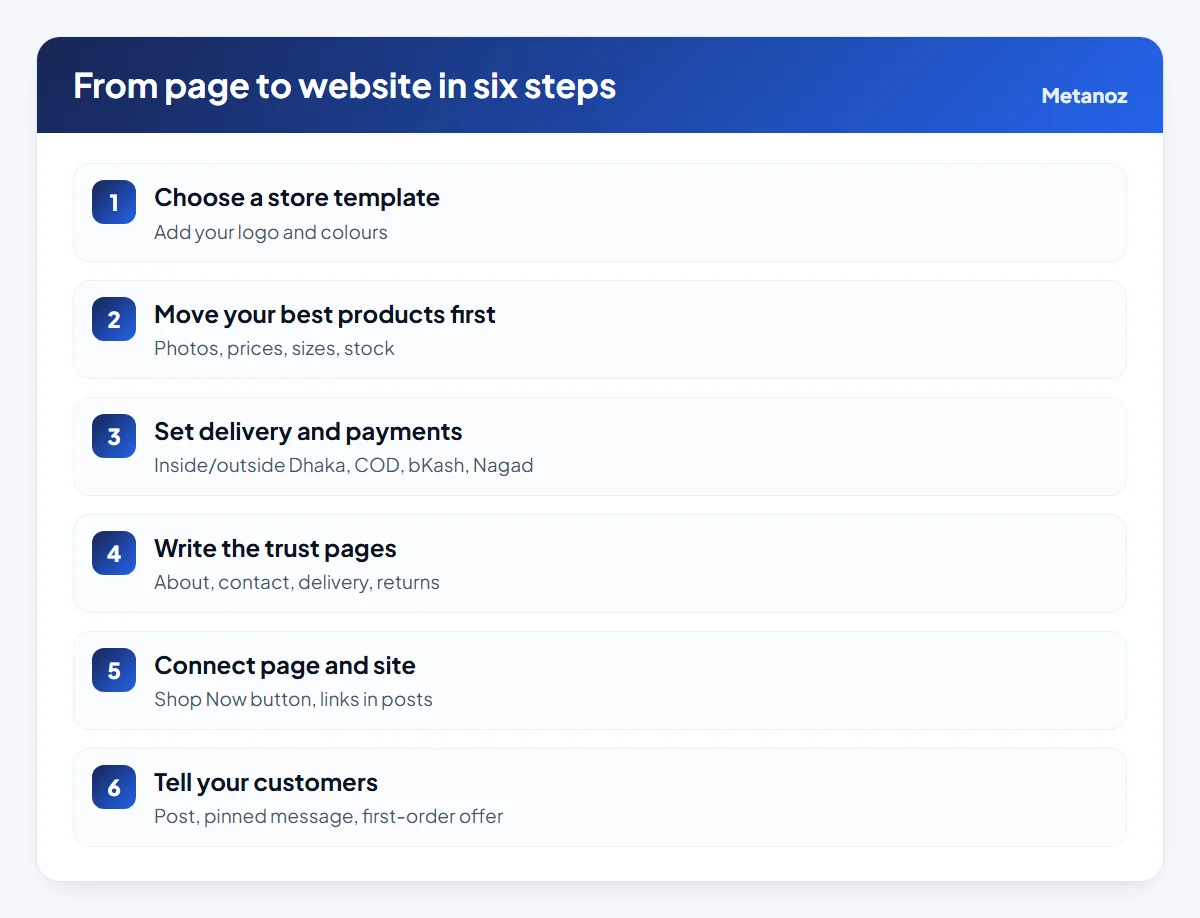
- Choose a store template. Pick one close to what you sell, then add your logo, colours and a banner that says what you sell and how people pay ("Cash on delivery across Bangladesh"). Metanoz has 58 online-store templates and 9 single-product templates.
- Add your best products first. Create a few clear categories, then add products with photos, prices, variants (size, colour) and stock. The help article on adding products shows each field. You can add the rest over the following weeks.
- Set delivery and payments. Enter delivery charges inside and outside Dhaka, switch on cash on delivery, and add your bKash and Nagad numbers so customers can pay and enter the transaction ID at checkout. On Metanoz the money goes straight to your number with no commission. If you have an SSLCommerz merchant account, connect it for card and automatic wallet payments.
- Write the trust pages. About (who you are, where you are), contact (phone, WhatsApp, area), delivery and returns. New buyers check these before ordering from an unfamiliar shop.
- Connect the page and the site. See the next section.
- Tell your customers. A post, a pinned message and, if you have their numbers, an SMS. A small first-order offer on the website helps people try it.
For a full walkthrough of the store setup itself, including couriers and a test order, see how to build an e-commerce website in Bangladesh.
Connecting page and site
The page and the website should feel like one shop:
- "Shop Now" button on your page, pointing to your website.
- Product links in posts: every product post links to that product's page, not just the home page, so buyers reach the order button in one tap.
- Inbox replies with links: save a reply for "price?" that includes the price and the product link. If a customer still wants to order in the inbox, enter the order on the website yourself so every order lives in one list.
- Same information everywhere: prices, delivery charges and offers should match on the page and the website.
- Post from the website: on Metanoz, the Facebook Posts app (Business plan) lets you post to your page or schedule posts from the admin, and can post every new product or blog article for you.
The Live Chat app adds a chat button to your website; when you are away, visitors leave their name and number or continue on WhatsApp. All apps are listed on the apps page.
The first month
- Week 1: place a test order yourself on your phone, then ask two friends to order and watch where they hesitate.
- Week 2: add the next batch of products; confirm every cash-on-delivery order by phone or SMS before sending.
- Week 3: count orders from the website versus the inbox. If most still come by inbox, check that your posts link to products.
- Week 4: write titles and descriptions for your categories, connect your own domain if you have one, and add the site to Google Search Console.
Do not switch off the inbox. Some customers will always prefer to ask first. Answer them, then send the product link. Over a few weeks, more of them will order directly.
A small shop does not need a big website. For what a small business site should include, see our guide to a website for a small business in Bangladesh.
What it costs
On Metanoz, the online store is in the Business plan (contact us for pricing), paid by bKash, Nagad or Rocket, with a 7-day free trial and no card needed. You can start on a free yourshop.metanoz.com address and connect your own domain later; Metanoz does not sell domains, so you buy one from any seller in your own name. If you sell only a handful of products through occasional posts and the inbox is manageable, you may not need a website yet, and that is fine.
Start your website today
Pick a template and a name; Metanoz sets up the rest. 7 days free, no card needed.
Start freeSee templatesFrequently asked questions
Do I need to close my Facebook page after making a website?
No. The page is still one of the best ways to reach new customers and talk to them. Use it to bring people in, and the website to take orders.
Can I import my Facebook products automatically?
Generally you add products to the website yourself, reusing your best photos and descriptions. Start with your best sellers, so the shop is useful from day one, and add the rest over time.
Will my Facebook customers actually order on a website?
Many will, especially when posts link straight to the product and cash on delivery is available. Some will keep asking in the inbox; send them the product link or enter their order yourself.
Do I need a trade licence to start a website?
Not to build the website or take cash on delivery and bKash or Nagad payments to your number. Payment gateways and business bank accounts usually ask for one.
How long does it take to move from a page to a website?
With a template and your products ready, most sellers can open the shop within a few days, adding more products over the following weeks.
What if my page gets restricted after I have a website?
Your shop, products, orders and customer list stay on your website. You can tell customers by SMS and keep selling while you sort out the page.
 ফেসবুক পেজ থেকে ওয়েবসাইট বানানোর নিয়ম: পণ্য, ছবি আর গ্রাহক নিয়ে ধাপে ধাপে
 ওয়েবসাইট থেকে ফেসবুক পেজে অটো পোস্ট: নতুন পণ্য আর ব্লগ নিজে নিজে শেয়ার
 ফেসবুক বিজ্ঞাপনের ভিজিটর ওয়েবসাইটে আনলে কী লাভ, কীভাবে করবেন