

নতুন পেজ যোগ করুন (এক ক্লিকে টেমপ্লেট সহ)Add a new page (with one-click templates)
Admin → Pages → Templates-এ প্রস্তুত পেজ আছে: About, Contact, FAQ, Policy আর আরও।Admin → Pages → Templates has ready pages: About, Contact, FAQ, policies and more.
ভিডিওতে দেখুনWatch the video

হালনাগাদUpdated:
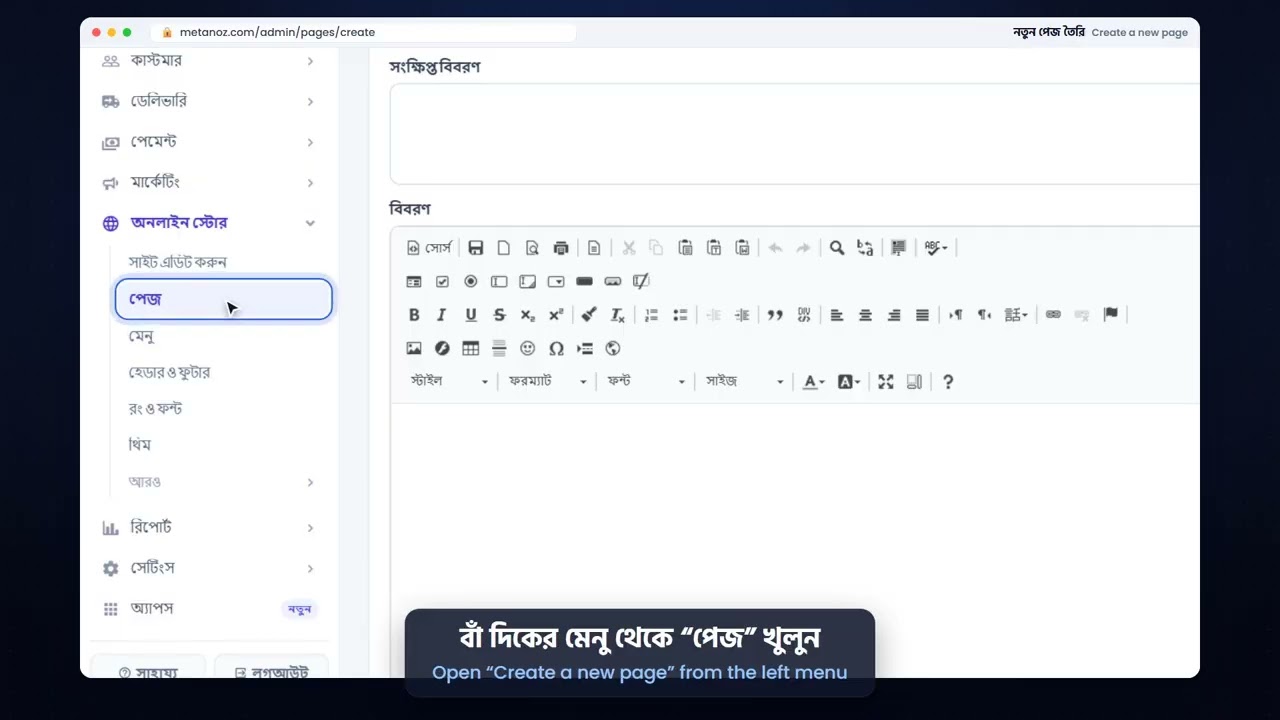
- Admin → Pages → Templates খুলুন।
- উপরের ফিল্টার দিয়ে ধরন বাছুন (পরিচিতি, যোগাযোগ, নীতিমালা, বিক্রি…), তারপর "Preview" দেখে "Use" চাপুন।
- পেজটি তৈরি হলে Page builder-এ খুলে নিজের লেখা বসান। আপনার ফোন, ঠিকানা, পণ্য আর রিভিউ সাইট থেকেই নেওয়া হয়; যে তথ্য নেই সেই অংশ লুকানো থাকে।
- Admin → Menus-এ গিয়ে পেজটি মেনুতে যোগ করুন, যাতে ভিজিটররা খুঁজে পান।
- Open Admin → Pages → Templates.
- Filter by kind (about, contact, policies, sales…), look at the "Preview" and press "Use".
- Open the new page in the Page builder and add your own words. Your phone, address, products and reviews are filled in from your site; parts without data stay hidden.
- Go to Admin → Menus and add the page to a menu so visitors can find it.
এই আর্টিকেলটি কি কাজে লেগেছে?Was this article helpful?
আরও সাহায্য দরকার?Need more help? আমাদের টিমের সাথে মিটিং বুক করুনBook a meeting with our team